The short answer
Search map listings one county at a time, keep only true category matches inside your area, dedupe by listing ID, then search each business's website, Facebook page and directory entries for emails and verify them. In our 285,744 finished rows, 80.8% had a website and 90.9% of those turned up an email, so about 73 of every 100 businesses you keep end up emailable.
Every list on this site is built the same way, and we have run the method across 323 finished lists and 285,744 businesses. That gives us something most guides on this topic don't have: the share of rows that make it through each step. Use those shares to size the job. If you need 1,000 businesses you can email, you will handle about 2,667 search results to get there.
The steps below work with a spreadsheet and a browser, or with a scraper and a script. The order matters more than the tools.
What a usable row contains
Decide the columns before you collect anything. Adding a column halfway through means visiting every business twice. These are the fields we collect, and how often each one was filled across our finished lists.
| Field | Why you need it | Filled in our rows |
|---|---|---|
| Business name and category | Who they are and whether they belong on the list | 100% |
| Phone | The fallback channel when there is no email | 95.4% |
| Website | Where most emails come from, and your dedupe key | 80.8% |
| The business's own address, checked before use | 73.5% | |
| Second email | A backup for when the first address bounces or goes unread | 53.1% |
| Opening hours | When to call | 76.7% |
| Address, city, county, ZIP | Territories and mail | 100% |
| Rating, review count, claimed status | Size and activity signals for sorting | 75.3% claimed |
| Social profiles | A second route in, and a way to check the business is active | 63.0% (Facebook 56.8%) |
| Map listing link | Proof the business exists, for anyone who checks a row | 100% |
Two columns people skip and regret: the map listing link and the listing ID. The link lets anyone on your team check a row in one click. The ID is the only reliable way to dedupe, which matters more than you would think (step 4).
The method, step by step
- 01
Define the category and the area
Write down the exact listing categories you want (for dentists: dentist, dental clinic, orthodontist, endodontist) and the ones you don't (dental lab, dental supply). Use counties as your unit of area. Cities are fuzzy at the edges and ZIP codes are too small to search one by one.
- 02
Search every county with two or three terms
A single search for "dentist" misses practices listed as "dental office". Run two or three terms per county. Searches overlap, so expect repeats: 29.5% of the 559,794 results we pulled were the same business showing up again.
- 03
Filter by category, area and status
Read the main category on each listing, not the name. Of 394,526 distinct listings our searches returned, 22.7% had the wrong category, 4.1% sat outside the area and 0.7% were permanently closed. Only 72.4% made it into a list.
- 04
Dedupe by listing ID, not by name
Names repeat (a franchise has many branches) and change ("Smith Dental" becomes "Smith Family Dentistry"). The listing ID doesn't. Keep one row per location, and dedupe again by website when you merge lists from different sources.
- 05
Search for emails, starting with the website
Open the site, then the contact, about and team pages. Then check the Facebook page and the business's directory entries. Only 55.2% of the first emails we found came from the business's own site; the rest came from Facebook, search results, other sites and directories.
- 06
Clean the emails
Drop system inboxes (noreply@, webmaster@, privacy@, careers@) and any address that shows up on several unrelated businesses: that is a vendor, a franchise head office or a directory, not the business. Rank an address on the business's own domain above a free-mail one.
- 07
Verify, then refresh before every send
Run every address through a verifier before the first send, and re-run the searches before each new campaign. See how to verify an email list.
What survives each step, across our finished lists
- 1559,794 search resultstwo or three terms per county
- 2394,526 distinct listings29.5% were repeats
- 3285,744 businesses kept72.4% match category, area and status
- 4230,924 with a website80.8% of kept
- 5209,901 with an email73.5% of kept
Finding emails: the website is only half the job
The website decides almost everything. In our finished rows, 90.9% of businesses with any website had an email we could use, and businesses with no website had none. So the share of your list that has a website is close to the ceiling on your email rate. That share varies a lot by trade, which we break down in which industries publish email addresses.
But don't stop at the website itself. When we traced where each business's first email came from, a little over half were on the business's own pages. Facebook pages were the next biggest source. Then came search result snippets, other websites that list the business (a chamber of commerce, a supplier's dealer page), and directories such as BBB.
Where the first email for each business was found
A few habits save time on the website itself. Check the footer first, then /contact, then /about and /team. Search the page source for "mailto:", because some sites show an address as a button. If the only contact is a form, note it and move on: a form is not an email, and you can come back to it for a call list.
Verification and refresh
Verify every address, including the ones you copied by hand from a contact page. A verifier checks that the domain takes mail and that the mailbox answers; it catches typos, dead domains and addresses that were taken down. Do it before the first send and again for any list older than a campaign or two. Our step-by-step is in how to verify an email list, and the legal side of sending is in CAN-SPAM rules for cold email.
Listings change slowly but steadily. In our finished rows, 0.7% were marked temporarily closed on the day we built the list, and another 0.7% of what the searches returned was already permanently closed. The cheap way to refresh is to re-run the same county searches and diff the listing IDs: new IDs are new businesses, missing ones have closed or changed category.
How long it takes, and when to buy instead
We don't publish a minutes-per-row figure, because it depends on you, the trade and how much each row needs. Time your first 20 businesses and read your pace off the table. To end with 1,000 emailable businesses you research about 1,361 (because 73.5% have an email), and skim another 520 or so listings you throw away.
| Your pace per kept business | Hours for 1,361 businesses | Plus skimming 519 rejects at 15 to 30 seconds |
|---|---|---|
| 2 minutes | 45.4 hours | 2.2 to 4.3 hours |
| 4 minutes | 90.7 hours | 2.2 to 4.3 hours |
| 6 minutes | 136.1 hours | 2.2 to 4.3 hours |
A scraper cuts that to setup time plus a few dollars of credits, and leaves you the cleaning in steps 3, 4 and 6. Building by hand makes sense for a few dozen named accounts you will research anyway. For a few hundred rows or more in a common trade, the numbers in buy vs build a lead list usually favour buying. A ready-made list is $29 once for the whole file, and you can check 12 complete rows free before paying. Every list page shows how it was built:
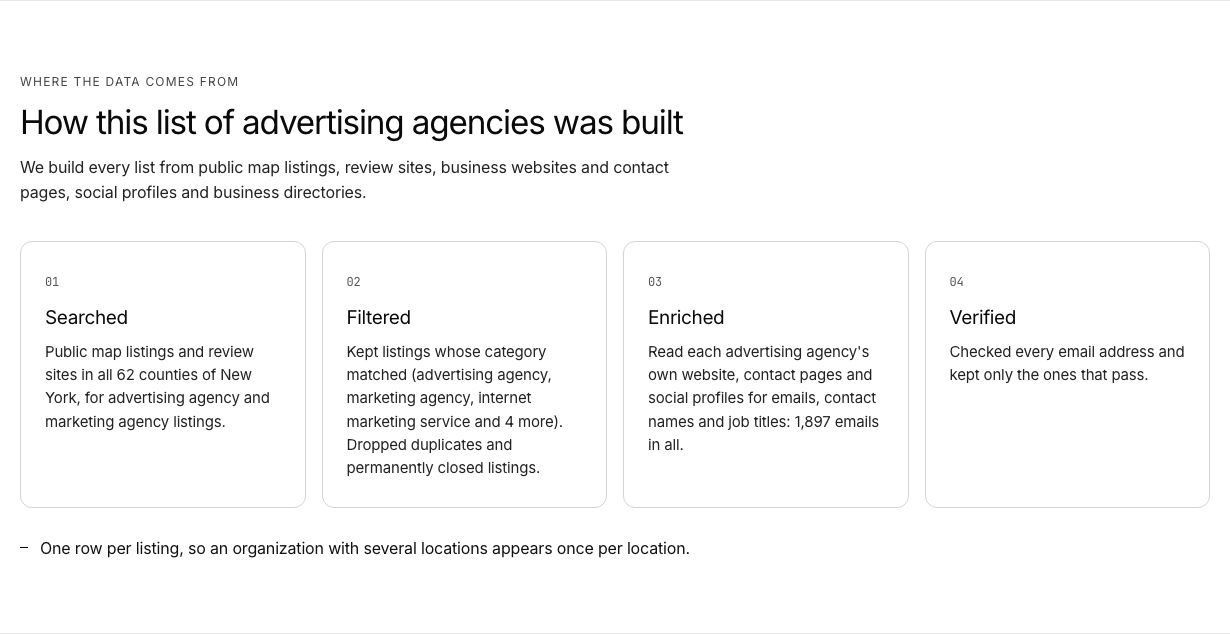
If you need a trade or area we don't have, a Bespoke plan runs this exact method to your brief: $99 a month for 2,000 verified leads, or $199 for 5,000. Compare it with doing the same in Outscraper or your own scraper, or see pricing.